How SMS Opt-In Works
GameView Armada Access Codes is a closed, employment-related messaging program: it texts a daily access code to venue staff members who have been approved to use the GameView Armada TV-control app at their workplace. It sends no marketing, enrolls no consumers, and uses no purchased lists.
1. Who gets messages, and how they consent
The end user gives consent themselves, on our website. A manager can nominate a colleague, but a nomination alone never enrolls anyone and never causes a single message to be sent — only the staff member's own tick of the consent box does.
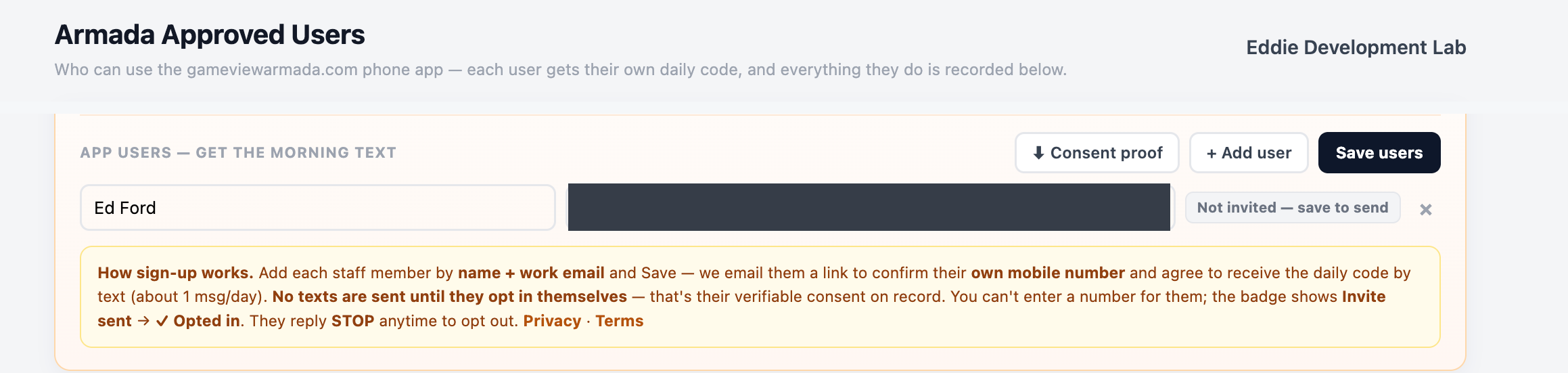
- A participating venue's manager or owner signs in to the GameView management portal (gameviewmanager.com), opens GameView Armada → Approved Users, and enters the staff member's email address to send them an invitation. No phone number is collected at this stage and the person is marked pending.
- The staff member receives that email and follows the link to the sign-up form on gameviewarmada.com. They enter their own mobile number and they tick the consent box — which is unticked by default. Nothing is submitted, and no number is stored, until they do both.
- They then receive approximately one text per day — their personal access code — and can revoke consent at any time by replying STOP, by following the unsubscribe link in the accompanying email, or by asking their manager to disable them (immediate).
The live form normally opens from a personal invitation link, so we publish a preview of the identical form — sample venue, submission disabled — that anyone can open without an account:
https://gameviewarmada.com/sms-optin.html?preview=1
The consent checkbox is unticked, exactly as a real user finds it.
"I agree to receive recurring automated text messages from GameView Armada at the mobile number above — about 1 message per day (my daily access code), plus occasional access notices. Message & data rates may apply; message frequency varies. I can reply STOP at any time to opt out, or HELP for help. Consent is not a condition of employment or of any purchase."
2. Where the invitation is sent from
The portal screen a manager uses to invite a colleague (sample data shown). This screen collects an email address only — consent itself happens on the public form above:
3. What the messages look like
Frequency: approximately 1 message per day per user (a replacement code may occasionally be sent the same day). Message and data rates may apply.
4. Opting out
- Reply STOP to any message — texts to that number end immediately.
- Reply HELP for help, or email eford@dtvgamecontrol.com.
- The venue can also disable a user in the portal at any time (takes effect immediately, including revoking the current code).
Consent is never a condition of employment or purchase — a staff member who opts out can get their daily code from their manager another way.
5. Program policies
- SMS Privacy Policy — no mobile information is shared with third parties or affiliates for marketing or promotional purposes; opt-in data is never sold or rented.
- Terms of Service — including the full SMS program terms.
- GameView Privacy Policy — the platform-wide policy.
Questions about this program: eford@dtvgamecontrol.com · GameView / DTV GameControl